
vue使用多种方式实现搜索框时时搜索
标签:
vue
大家今天vue课程实战系列又更新了,今天我们继续上次更新的内容继续实现搜索框动态时时搜索
效果图如下:
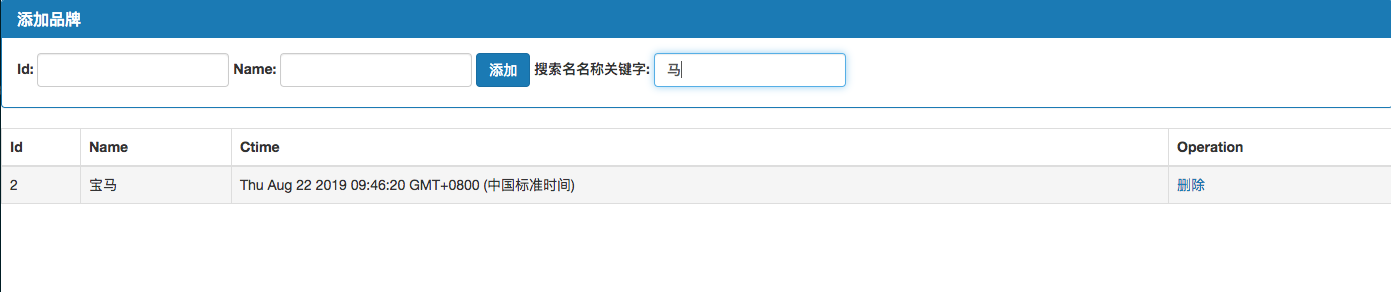
在做案例之前,先介绍下用到的新知识点,es6新语法 includes 先看一个例子让我们理解下这个方法的使用
实例
检测数组 site 是否包含 runoob :
let site = ['runoob', 'google', 'taobao'];
site.includes('runoob');
// true
 site.includes('baidu');
// false
下面开始我们的案例讲解,在这个案例中我们会使用多个方法实现这个搜索框搜索的效果实现,使用函数,使用计算属性都可以实现最终的效果,让我们一起学习下。
首先 我们先使用第一种方法用普通函数实现:
在methods 方法中加入 search方法,方法中加入参数 search(keywords)
模版中双向绑定 keywords
代码片段如下:
   <tr v-for="item in search(keywords)" :key="item.id">

        <td>{{ item.id }}</td>
        <td>{{ item.name }}</td>
        <td>{{ item.ctime }}</td>
        <td><a href="" @click.prevent="del(item.id)">删除</a></td>
    </tr>
完整的html代码:
<div id="app">
    <div class="panel panel-primary">
        <div class="panel-heading">
            <h3 class="panel-title">添加品牌</h3>
        </div>
        <div class="panel-body form-inline">

            <label>
                Id:
                <input type="text" class="form-control" v-model="id">
            </label>

            <label>
                Name:
                <input type="text" class="form-control" v-model="name">
            </label>

            <input type="button" value="添加" class="btn btn-primary" @click="add">
            <label>
                搜索名名称关键字:
                <input type="text" class="form-control" v-model="keywords">
            </label>
        </div>
    </div>
<table class="table table-bordered table-hover table-striped">
    <thead>
    <tr>
        <th>Id</th>
        <th>Name</th>
        <th>Ctime</th>
        <th>Operation</th>
    </tr>
    </thead>
    <tbody>
    <tr v-for="item in search(keywords)" :key="item.id">
        <td>{{ item.id }}</td>
        <td>{{ item.name }}</td>
        <td>{{ item.ctime }}</td>
        <td><a href="" @click.prevent="del(item.id)">删除</a></td>
    </tr>
    </tbody>
</table>
</div>
vue中加入keywords 设定一个默认值
data : {
    id : '',
    name : '',
    keywords: '',
    list : [
        { id : 1, name : '奔驰', ctime: new Date()},
        { id : 2, name : '宝马', ctime: new Date()},
    ]
},
方法中加入 search 这个里有两种方法可以实现先介绍常规思维的实现
search(keywords){

    var newList =[];
    this.list.forEach(iterm=>{
        if (iterm.name.indexOf(keywords) !== -1) {
            newList.push(iterm);
        }
    });
    return newList;
}
上面使用了indexOf方法实现查找字符串然后更新数组
方法2 :使用 es6 新语法 includes
代码片段:
search(keywords){
    return this.list.filter(iterm=>{
        if (iterm.name.includes(keywords)) {
            return iterm;
        }
    });
}
这是就是本文开头介绍的includes方法结合过滤器实现的。本文是实战课程,有关过滤器的使用请查阅相关资料。
还可以使用计算属性 computed 实现搜索框的过滤功能
下面我们把上面的html代码改造下。片段如下:
<tr v-for="item in newList" :key="item.id">
    <td>{{ item.id }}</td>
    <td>{{ item.name }}</td>
    <td>{{ item.ctime }}</td>
    <td><a href="" @click.prevent="del(item.id)">删除</a></td>
</tr>
这里我们去除了search方法使用计算属性 newList来实现同样的效果
我们 在vue中加入计算属性 newList 代码片段如下:
computed : {
    newList : function() {
        return this.list.filter(iterm=>{
            if (iterm.name.includes(this.keywords)) {
                return iterm;
            }
        });
    }
}
我们使用计算属性之前要把之前定义methods search方法要删除掉,切记!
最后附上完整代码
<!DOCTYPE html>
<html lang="en">
<head>
    <meta charset="UTF-8">
    <title>购物车示例</title>
    <link rel="stylesheet" href="./bootstrap-3.3.7-dist/css/bootstrap.min.css">
</head>
<body>
<div id="app">
    <div class="panel panel-primary">
        <div class="panel-heading">
            <h3 class="panel-title">添加品牌</h3>
        </div>
        <div class="panel-body form-inline">

            <label>
                Id:
                <input type="text" class="form-control" v-model="id">
            </label>

            <label>
                Name:
                <input type="text" class="form-control" v-model="name">
            </label>

            <input type="button" value="添加" class="btn btn-primary" @click="add">
            <label>
                搜索名名称关键字:
                <input type="text" class="form-control" v-model="keywords">
            </label>
        </div>
    </div>
<table class="table table-bordered table-hover table-striped">
    <thead>
    <tr>
        <th>Id</th>
        <th>Name</th>
        <th>Ctime</th>
        <th>Operation</th>
    </tr>
    </thead>
    <tbody>
<!--    <tr v-for="item in search(keywords)" :key="item.id">-->
    <tr v-for="item in newList" :key="item.id">
        <td>{{ item.id }}</td>
        <td>{{ item.name }}</td>
        <td>{{ item.ctime }}</td>
        <td><a href="" @click.prevent="del(item.id)">删除</a></td>
    </tr>
    </tbody>
</table>
</div>
<script src="https://cdn.bootcss.com/vue/2.6.10/vue.js"></script>
<script>
    var vue  = new Vue({
       el : '#app',
       data : {
           id : '',
           name : '',
           keywords: '',
           list : [
               { id : 1, name : '奔驰', ctime: new Date()},
               { id : 2, name : '宝马', ctime: new Date()},
           ]
       },
       methods : {
           add(){
               var car = {id: this.id,name:this.name,ctime:new Date()};
               this.list.push(car);
           },
           del(id) {
               //第一种方法,可以实现不推荐
                /*this.list.some((item,i)=>{
                    if(item.id === id) {
                        this.list.splice(i,1);
                        return true;
                    }
                })*/
                //推荐使用内部的findIndex实现获取索引
               var index = this.list.findIndex(item=>{
                    if(item.id === id) {
                        return true;
                    }
               });
               this.list.splice(index,1);
           },
           //方法1 使用indexOf
           /*search(keywords){

               /!*var newList =[];
               this.list.forEach(iterm=>{
                   if (iterm.name.indexOf(keywords) !== -1) {
                       newList.push(iterm);
                   }
               });
               return newList;*!/
           }*/
           //方法2 使用 es6新语法 includes
           /*search(keywords){
               return this.list.filter(iterm=>{
                   if (iterm.name.includes(keywords)) {
                       return iterm;
                   }
               });
           }*/
       },
        //方法3 使用计算属性
        computed : {
            newList : function() {
                return this.list.filter(iterm=>{
                    if (iterm.name.includes(this.keywords)) {
                        return iterm;
                    }
                });
            }
        }
    });
</script>
</body>
</html>
今天文章更新到这,下次我们会接着这个案例继续更新,感谢大家的阅读!