
es6实现仿百度搜索建议
标签:
vue
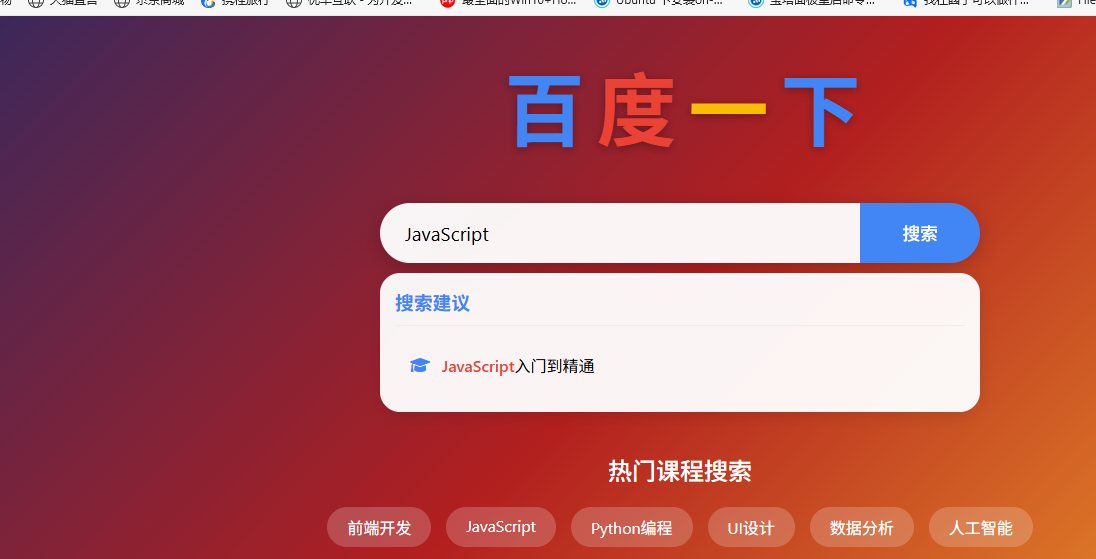
大家好!很久没更新教程了,今天给大家出一期 es6的案例,使用 es6 语法 实现 百度搜索框建议的小案例
效果如下:
<!DOCTYPE html>
<html lang="en">

<head>
    <meta charset="UTF-8">
    <meta name="viewport" content="width=device-width, initial-scale=1.0">
    <title>百度风格搜索框</title>
    <link rel="stylesheet" href="https://cdnjs.cloudflare.com/ajax/libs/font-awesome/6.0.0/css/all.min.css">
    <style>
        * {
            margin: 0;
            padding: 0;
            box-sizing: border-box;
            font-family: 'Segoe UI', Tahoma, Geneva, Verdana, sans-serif;
        }

        body {
            background: linear-gradient(135deg, #1a2a6c, #b21f1f, #fdbb2d);
            min-height: 100vh;
            display: flex;
            justify-content: center;
            align-items: center;
            padding: 20px;
        }

        .container {
            width: 100%;
            max-width: 800px;
            text-align: center;
        }

        .logo {
            margin-bottom: 40px;
        }

        .logo h1 {
            font-size: 5rem;
            color: #fff;
            text-shadow: 0 2px 10px rgba(0, 0, 0, 0.3);
            letter-spacing: -5px;
        }

        .logo h1 span:nth-child(1) {
            color: #4285f4;
        }

        .logo h1 span:nth-child(2) {
            color: #ea4335;
        }

        .logo h1 span:nth-child(3) {
            color: #fbbc05;
        }

        .logo h1 span:nth-child(4) {
            color: #4285f4;
        }

        .logo h1 span:nth-child(5) {
            color: #34a853;
        }

        .logo h1 span:nth-child(6) {
            color: #ea4335;
        }

        .search-container {
            position: relative;
            width: 90%;
            max-width: 600px;
            margin: 0 auto 40px;
        }

        .search-box {
            display: flex;
            height: 60px;
            border-radius: 30px;
            overflow: hidden;
            box-shadow: 0 5px 20px rgba(0, 0, 0, 0.2);
        }

        #val {
            flex: 1;
            padding: 0 25px;
            font-size: 1.2rem;
            border: none;
            outline: none;
            background: rgba(255, 255, 255, 0.95);
        }

        #val::placeholder {
            color: #999;
        }

        #sub {
            width: 120px;
            background: #4285f4;
            color: white;
            border: none;
            font-size: 1.1rem;
            font-weight: 500;
            cursor: pointer;
            transition: background 0.3s;
        }

        #sub:hover {
            background: #3367d6;
        }

        .show {
            width: 100%;
            min-height: 100px;
            height: auto;
            background: rgba(255, 255, 255, 0.95);
            border-radius: 20px;
            margin-top: 10px;
            padding: 15px;
            box-shadow: 0 5px 15px rgba(0, 0, 0, 0.1);
            display: none;
            text-align: left;
            overflow: hidden;
        }

        .show h3 {
            color: #4285f4;
            margin-bottom: 15px;
            padding-bottom: 10px;
            border-bottom: 1px solid #eee;
        }

        .suggestion-list {
            list-style: none;
        }

        .suggestion-item {
            padding: 12px 15px;
            border-radius: 8px;
            margin-bottom: 8px;
            cursor: pointer;
            display: flex;
            align-items: center;
            transition: all 0.2s;
        }

        .suggestion-item:hover {
            background: #f1f5ff;
        }

        .suggestion-item i {
            margin-right: 12px;
            color: #4285f4;
        }

        .suggestion-text {
            flex: 1;
            display: flex;
            justify-content: space-between;
        }

        .highlight {
            color: #ea4335;
            font-weight: 500;
        }

        .popular-searches {
            margin-top: 30px;
            color: #fff;
            text-align: center;
        }

        .popular-searches h2 {
            margin-bottom: 20px;
            font-weight: 500;
        }

        .keywords {
            display: flex;
            justify-content: center;
            flex-wrap: wrap;
            gap: 15px;
        }

        .keyword {
            background: rgba(255, 255, 255, 0.2);
            color: #fff;
            padding: 8px 20px;
            border-radius: 20px;
            cursor: pointer;
            transition: all 0.3s;
        }

        .keyword:hover {
            background: rgba(255, 255, 255, 0.3);
            transform: translateY(-3px);
        }

        @media (max-width: 600px) {
            .logo h1 {
                font-size: 3.5rem;
            }

            .search-box {
                height: 50px;
            }

            #val {
                padding: 0 15px;
                font-size: 1rem;
            }

            #sub {
                width: 100px;
                font-size: 1rem;
            }
        }
    </style>
</head>

<body>
    <div class="container">
        <div class="logo">
            <h1>
                <span>百</span>
                <span>度</span>
                <span>一</span>
                <span>下</span>
            </h1>
        </div>

        <div class="search-container">
            <div class="search-box">
                <input type="text" id="val" placeholder="请输入课程关键词">
                <input type="submit" id="sub" value="搜索">
            </div>
            <div class="show" id="show">
                <h3>搜索建议</h3>
                <ul class="suggestion-list" id="suggestion-list">
                    <!-- 搜索建议将通过JavaScript动态添加 -->
                </ul>
            </div>
        </div>

        <div class="popular-searches">
            <h2>热门课程搜索</h2>
            <div class="keywords">
                <div class="keyword">前端开发</div>
                <div class="keyword">JavaScript</div>
                <div class="keyword">Python编程</div>
                <div class="keyword">UI设计</div>
                <div class="keyword">数据分析</div>
                <div class="keyword">人工智能</div>
            </div>
        </div>
    </div>

    <script>
        // 获取DOM元素
        const input = document.querySelector('#val');
        const show = document.querySelector('#show');
        const suggestionList = document.querySelector('#suggestion-list');
        const submitBtn = document.querySelector('#sub');
        const keywords = document.querySelectorAll('.keyword');

        // 课程数据库(模拟)
        const courses = [
            "HTML5基础教程",
            "CSS3高级技巧",
            "JavaScript入门到精通",
            "React框架实战",
            "Vue.js开发指南",
            "Node.js后端开发",
            "Python数据分析",
            "Java编程基础",
            "UI设计实战课程",
            "移动应用开发",
            "数据库原理与SQL",
            "Web安全技术",
            "人工智能入门",
            "机器学习实战",
            "数据结构与算法",
            "计算机网络基础",
            "向军前端开发教程"
        ];


        // 输入框键盘事件
        input.addEventListener('keyup', function () {
            const searchItem = this.value.trim();
            if (searchItem.length > 0) {
                updateSuggestions(searchItem);
                show.style.display = "block";
            } else {
                show.style.display = 'none';
            }
        });

        // 提交按钮事件
        submitBtn.addEventListener('click', function () {
            const searchTerm = input.value.trim();
            if (searchTerm.length > 0) {
                alert('正在搜索..');
            }
        });
        // 热门关键词点击事件
        keywords.forEach(keyword => {
            keyword.addEventListener('click', function () {
                input.value = this.textContent;
                input.dispatchEvent(new Event('keyup'));
                input.focus();
            });
        })

        function updateSuggestions(searchItem) {
            // 清空当前建议
            suggestionList.innerHTML = "";
            // 过滤匹配的课程
            const filterCourses = courses.filter(course =>
                course.toLowerCase().includes(searchItem.toLowerCase())
            );
            // 显示搜索结果数量限制
            const maxSuggestions = 5;
            const displayCourses = filterCourses.slice(0, maxSuggestions);
            if (displayCourses.length === 0) {
                // 没有匹配结果
                const item = document.createElement("li");
                item.className = "suggestion-item";
                item.innerHTML = `<i class="fa fa-search"></i><span>没有找到匹配的课程</span>`;
                suggestionList.append(item);
            } else {
                displayCourses.forEach(course => {
                    const item = document.createElement("li");
                    item.className = "suggestion-item";
                    // 高亮匹配部分


                    const index = course.toLowerCase().indexOf(searchItem.toLowerCase());
                    if (index >= 0) {
                        const before = course.substring(0, index);
                        const match = course.substring(index, index + searchItem.length);
                        const after = course.substring(index + searchItem.length);
                        item.innerHTML = `
                            <i class="fas fa-graduation-cap"></i>
                            <div class="suggestion-text">
                                <div>${before}<span class="highlight">${match}</span>${after}</div>
                            </div>
                        `;
                    } else {
                        item.innerHTML = `
                            <i class="fas fa-graduation-cap"></i>
                            <div class="suggestion-text">
                                <div>${course}</div>
                            </div>
                        `;
                    }
                    // 点击建议项填入搜索框
                    item.addEventListener('click', function () {
                        input.value = course;
                        show.style.display = 'none';
                    });
                    suggestionList.appendChild(item);
                })
            }
        }
        show.style.display = 'none';
    </script>
</body>

</html>